While the team actively moderate the comments section to ensure that Viki is kept a positive space for all, due to the volume of comments posted to each channel page or episode, we continue to rely on Viki members like you to report any comment you find inappropriate.
Everyone is empowered to flag comments that are in violation of the Viki Community Guidelines and/or Viki Comment Policy. Flagging a comment is entirely anonymous to the rest of the Viki members.
*Note: The flag feature is currently available on web browsers on Viki.com only.
How to flag a comment?

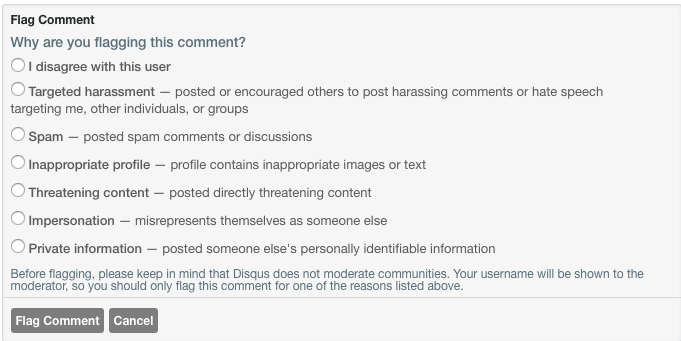
- Go to the comment you want to flag
- Tap on the drop-down arrow on the top right of the comment > Flag as inappropriate
- Select the reason for flagging > Flag Comment
What happens after I flag a comment?
Once a comment is flagged, the Viki team will be notified. The flagged comment(s) will be reviewed within 24 - 48 hours, and actions will be taken against comment(s) and/or user(s) who violate the Viki Community Guidelines and/or Viki Comment Policy.
Due to privacy reasons, the Viki team will be unable to share the results of each report.